← Back
Fintech · iOS + Android

Kidly — App

Full redesign of a school payments app — modernised registration, rebuilt key flows, and shipped a mirrored Arabic interface. Grew users by 13% in Q1.

Product Design User Research A/B Testing RTL / Arabic UI Mobile App
Role Solo designer — research to dev QA
Tools
Figma Design & Prototyping
Maze Usability testing
UserTesting Usability testing
Mixpanel A/B testing & Analytics
Context

Overview & Goals

Kidly lets parents handle all school payments — fees, excursions, uniforms — in one app. Growing competition exposed a core problem: the UX was dated, registration was slow, and the home screen offered no real utility. The UAE market added language complexity: a significant share of users prefer Arabic, which meant designing two coherent interfaces, not one with a translation layer.

Turn a dated school-payments app into a frictionless, market-leading product.

OKR +10% users in Q1 & reducing registration time
Launch Q1 2025
Process

What I Changed

Registration & Login redesign
01
14% dropout → 3%

Registration & Login

14% of users dropped out before finishing registration. Replaced the login/password-only flow with Google, Facebook, and Apple sign-in. Google became the dominant choice, and dropout fell from 14% to 3%.

Shipped
02
−40% time to first action

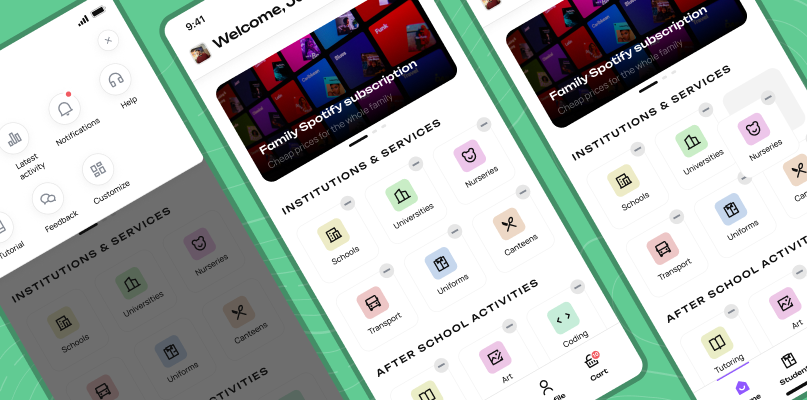
Home Screen

The old home screen was a static landing page with no quick actions. Rebuilt it around user-prioritised functions — students, offers, school features — with a path to a user-customisable layout.

Shipped
Home screen redesign
Student adding via API
03
0 lookup errors in testing

Student Adding via API

Connected to the UAE school/university API to look up students directly. Eliminated duplicate entries and mismatched school assignments — a top complaint in user surveys.

Shipped
04
+18% payment completion

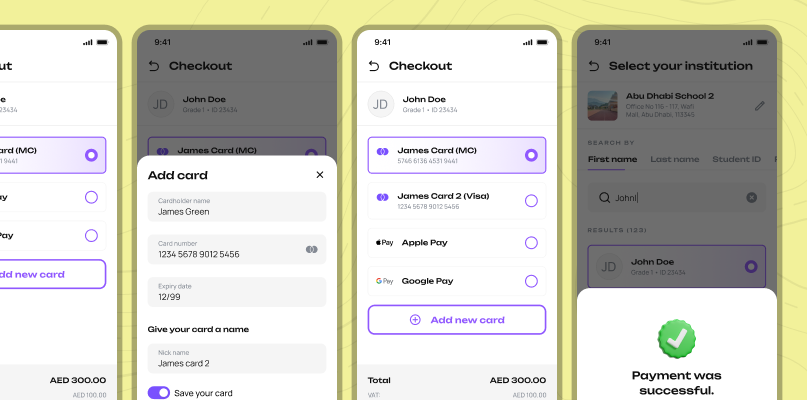
Payment Flow

Shortened multi-step payment flows by up to 50% by removing redundant confirmation screens and consolidating form fields. Fewer steps, same trust signals.

Shipped
Payment flow redesign
Customisable home screen
05
Dropped — backend dependency

Customisable home screen

User testing confirmed demand for a personalised home screen. We designed a draggable widget flow — it tested well. But the backend architecture wasn't ready, and shipping it half-built wasn't an option.

Dropped
Special consideration

Arabic interface — Right-to-Left as a UX problem

Arabic is read right-to-left — which means the entire spatial logic of the interface flips. Navigation, swipe directions, icon placement, reading order, and visual hierarchy all needed to be reconsidered, not just translated. A component that guides the eye left-to-right in English actively confuses an Arabic speaker.

We designed both versions in parallel rather than retrofitting. Every flow was validated separately with Arabic-speaking respondents from the UAE. Within the first month post-launch, 35% of active users were using the Arabic interface — confirming it as a first-class experience, not an afterthought.

Arabic RTL interface
Validation

Usability & A/B Testing

3 flow tests in parallel

Registration, home screen, and student adding were tested simultaneously. 30 UAE-based parents recruited and screened for active school payment behaviour — children aged 6–18.

Reduction in −60%

Registration time — Google sign-in dominant

Success rate 100%

Found their child in API — 0 lookup failures

Conclusions

Results

+13% User growth Q1 2025
−60% Registration time
97% Reg. completion (was 86%)
35% Arabic active users
Outcome

Effect

+13% user growth in Q1 2025 — above the 10% target. The Arabic interface captured 35% of active users within the first month. The new home screen architecture is extensible — adding features no longer requires a structural redesign. Projected 8–11% growth per quarter based on post-launch trajectory.

← Back to portfolio Next case →